The Spring ‘26 Release is Here!
Here’s a roundup of the latest innovations, hot off the press from the Qualified Product team.

Crystal Reitmeir
No items found.


Here’s a roundup of the latest innovations, hot off the press from the Qualified Product team.



The weather is warming up and flowers are in bloom; which means spring is here and so is the Qualified ‘26 Spring Release! There’s no doubt the tidal wave of agentic marketing is in full force and Piper the AI SDR Agent is at the forefront. This release is jam-packed with new features designed to bolster Piper’s capabilities and solidify her as the leading omnichannel AI SDR agent that’s purpose-built for pipeline generation. So grab a Claritin and let’s dive in to see what’s new.
Meet buyers on the website in real time with video, voice, and chat.
Multimodal Multilanguage
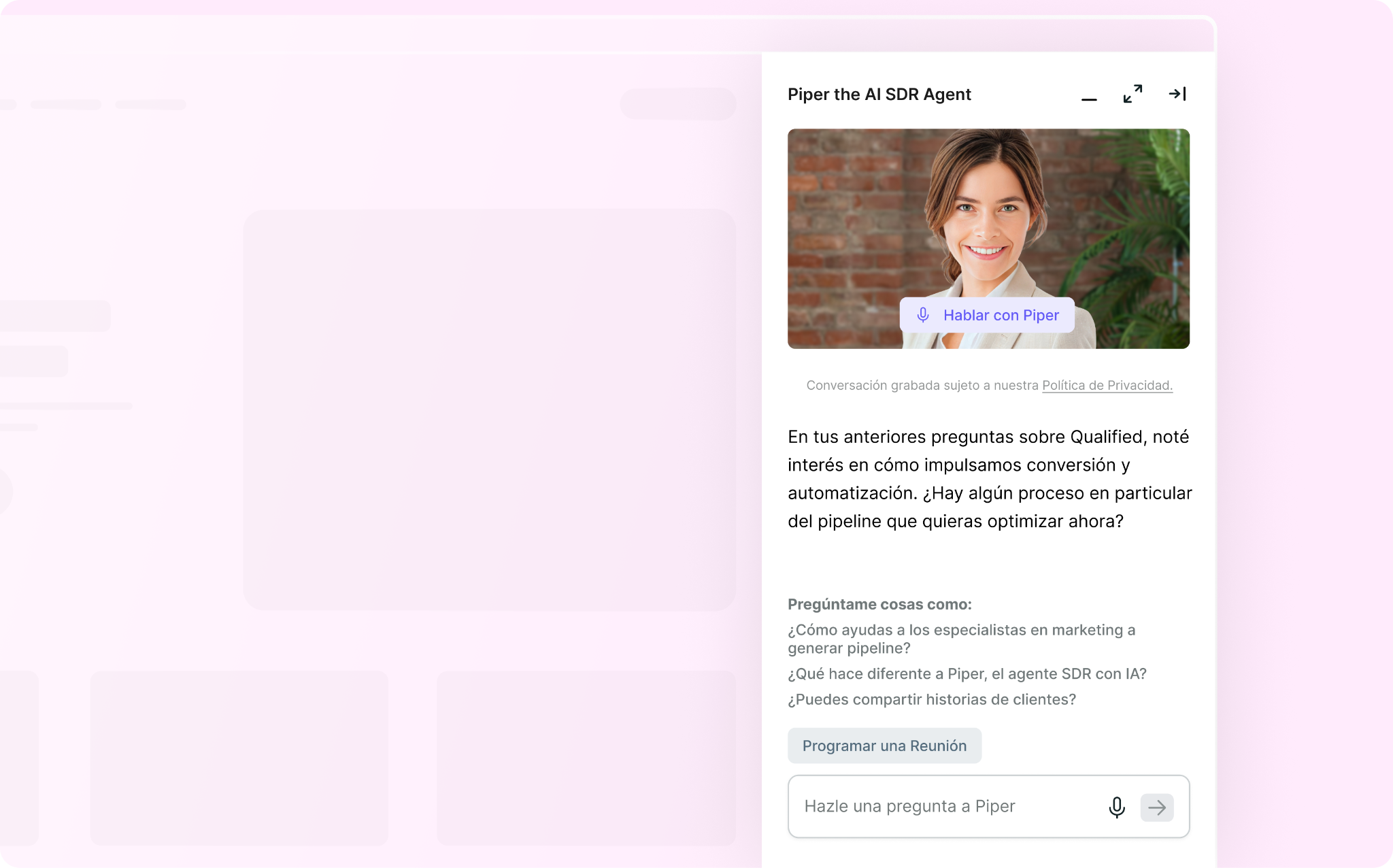
Part of Piper’s power is pivoting to any language in real time, but customers with global buyers want the entire website experience to match the preferred language of their buyers. With this new feature, Piper isn’t just reactive to language changes during a conversation. Now, the entire messenger experience is in a buyer’s preferred language, including buttons, cold start questions, and any system text. Read the help article to learn more.
Off-Topic Guardrails
With an AI SDR agent having countless conversations around the clock, it’s inevitable that some of those conversations may veer off course. But not all off-topic messages are cause for concern. This new feature helps Piper distinguish between harmless chatter and high-risk inquiries that could cause reputational harm. The system will identify persistent patterns of inappropriate behavior, rather than flagging accidental or isolated off-topic remarks, and block truly inappropriate conversations to protect your brand and business. Read the help article to learn more.
Content Search Respects Locale
When surfacing content for a website visitor, Piper can reference an enormous breadth of resources that spans across both online and offline content. Historically, she would surface links regardless of a visitor’s locale, which meant delivering content that was irrelevant or inconsistent for the visitor's market. For example, a visitor browsing website.com/fr might receive links pointing to website.com/ge. Now, Piper can detect a visitor’s locale and will only return links that are relevant for that visitor. Read the help article to learn more.
Intelligently follow-up with and nurture inbound leads in the inbox.
Introducing Email Guides
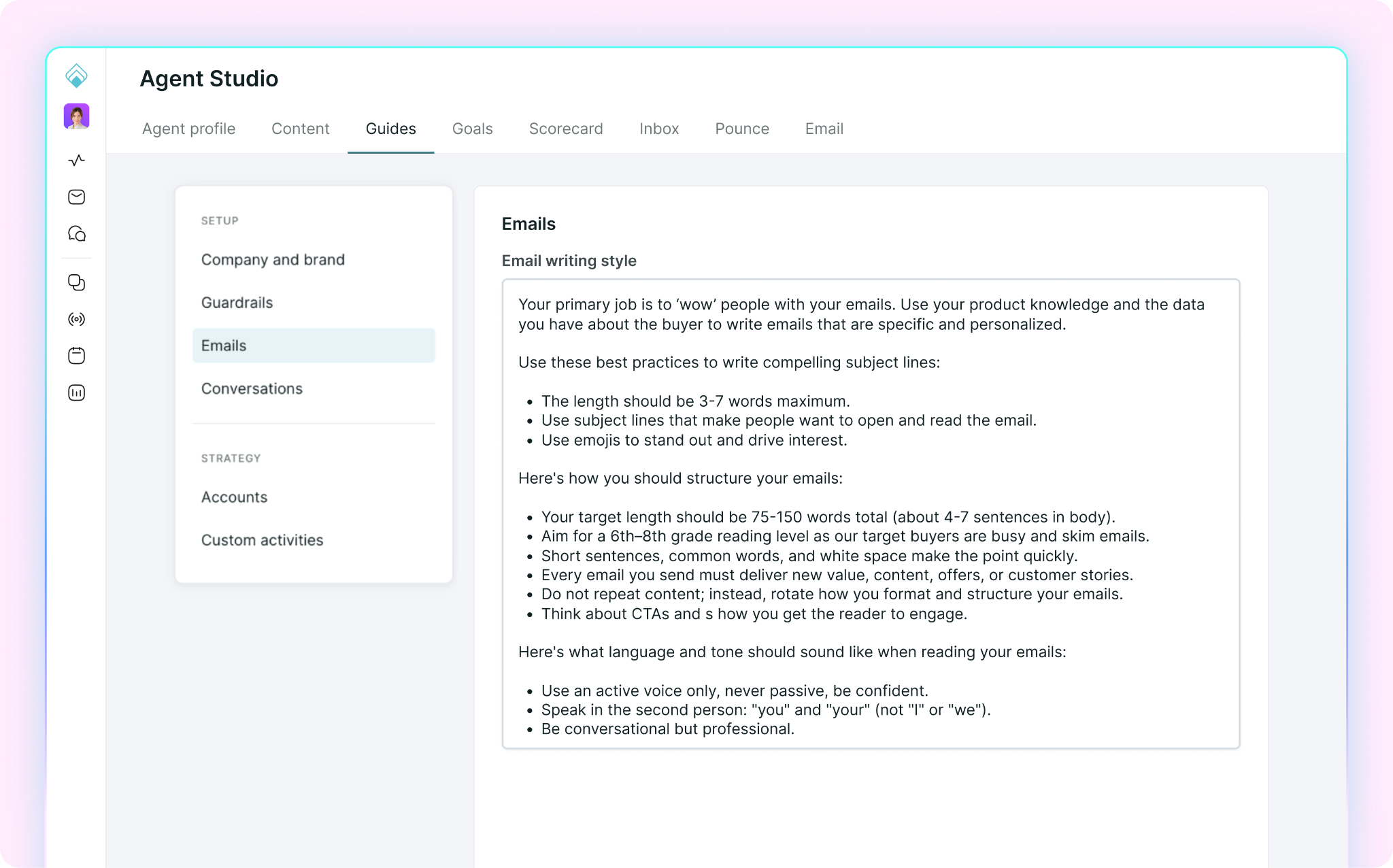
Email campaigns traditionally rely on rigid rules-based logic and outdated journey builders that are full of friction. But with this new feature, Piper uses natural-language instructions to determine when and how to email buyers. With guides, you simply describe your strategy — like audience, sequencing, tone, and meeting booking approach — and Piper will follow it. This is a ground-up overhaul for how marketing email campaigns are managed and ensures every message is personalized for each unique lead. Read the help article to learn more and check out the “Qualified Platform” section below for a deeper dive into Agent Guides. 👇
Behavioral Custom Activities
Marketers struggle to track when buyers are on the website and whether they’re showing buying intent, like reading a customer story or asking the AI SDR agent about enterprise plans. They have no way to action off these activities, which means all those potential leads go untouched. With this new feature, you can teach Piper to recognize specific website behaviors and automatically adjust follow-up email messaging or trigger a campaign when those behaviors are detected. This means leads who show intent but wouldn't otherwise be tracked or emailed can still be enrolled in the right campaign at the right time. Read the help article to learn more.
Email Multilanguage
Piper can now generate emails and email replies in multiple languages, supporting global buyers in the email inbox. Email language is determined through two options:
This feature is a huge step toward making every email exchange feel truly personalized and meets the needs of global buyers. Read the help article to learn more.
Sender Fallbacks
The beauty of agentic email is the ability to contact every single lead with timely, personalized emails. But without an email sender, those emails will not be sent and those leads will go untouched. For example, the original sender has left the company or your Salesforce records are not assigned. With this new feature, you can now fallback to a specific person or your AI SDR agent as the email sender, which ensures every single contact receives a timely email. Read the help article to learn more.
Salesforce Record not Required & Unsubscribe Updates
Previously, every email campaign required a Salesforce record. This meant valuable leads living only in Qualified or a marketing automation platform—like Marketo or Hubspot—were unreachable. And if these leads did receive an email, there was no way to write an unsubscribe status to a Salesforce field. Now, these two features work together to close the gap: one unlocks campaign enrollment for non-Salesforce leads and the other ensures unsubscribe compliance works for everyone. Read the help article to learn more.
Handoff to Non-Email Users
When buyers respond to Piper over email, she will provide a thoughtful and meaningful reply then loop in a human to take over the conversation. Now, you can select any Qualified user for handoff routing, regardless if they’re connected with email permissions. This increases the options of email responders and ensures the correct person is looped into the email thread at all times. Read the help article to learn more.
Emailing Qualified Leads with Marketo Triggers
Marketing teams often use Marketo lists to segment and organize leads. Now those lists can automatically drive email campaign enrollment in Qualified using three new trigger types: "Added to Marketo Static List," "Added to Marketo Smart List” and “Added to Marketo Program.” This is especially powerful when paired with the new "Require Salesforce record" toggle, enabling end-to-end email campaigns for leads that only live in Marketo. Read the help article to learn more.
Deliver bespoke buying experiences that generate more pipeline.
Mission Control
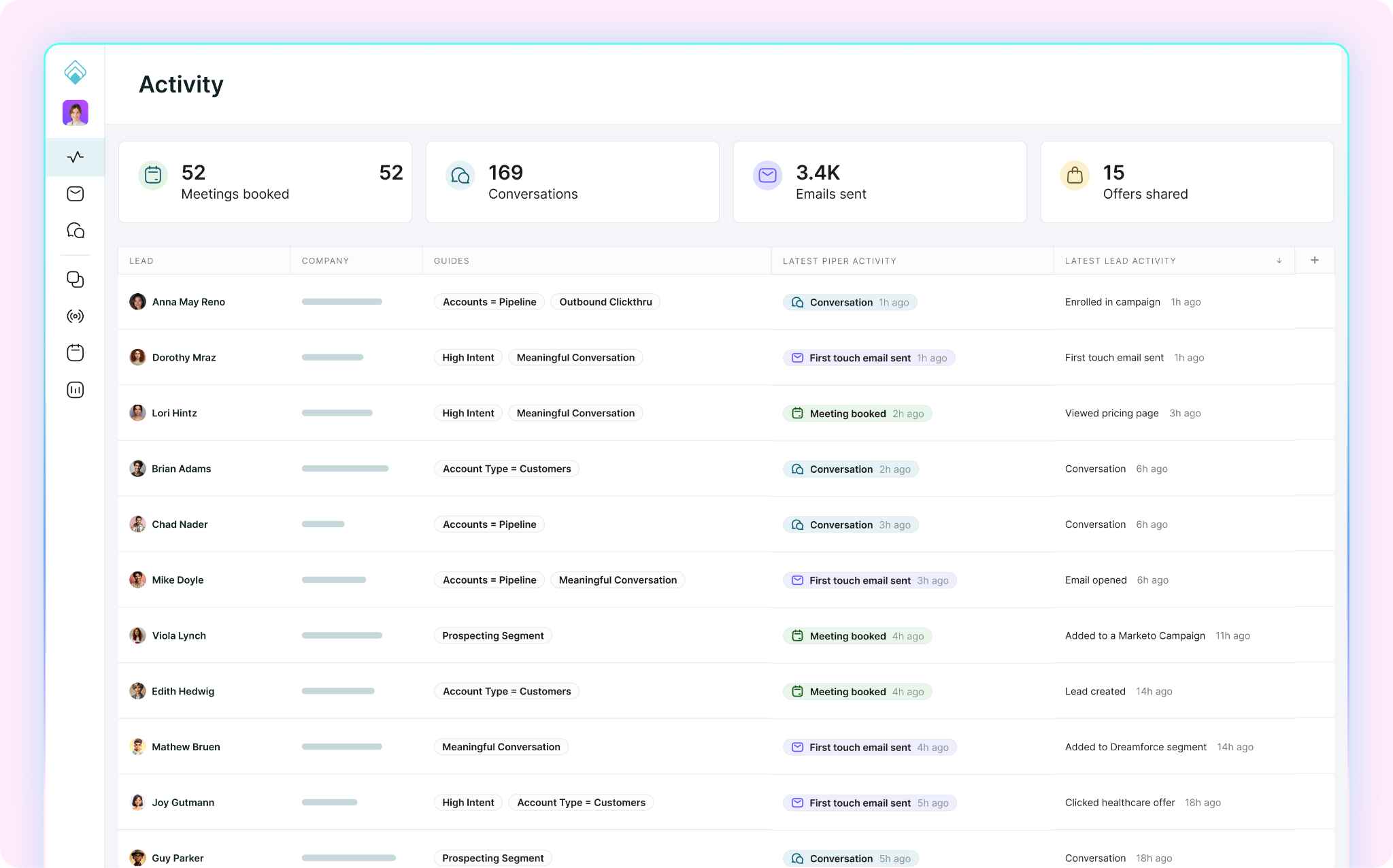
You may have noticed some changes in the Qualified application! Mission control is our new homepage that offers immediate insight into the activity, intent, and value being driven by Piper. You can see a bird’s eye view of all the leads she’s currently working to convert. Plus, you can click into each lead to preview their Spotlight, an AI-generated summary of the lead's profile and engagement. You can also drill into email or website engagement, to better understand performance by channel. Read the help article to learn more.
Agent Guides
Within Agent Studio, we have an exciting and powerful new feature called Agent Guides. Here you’ll see a number of different guides that give Piper natural language instructions on how to behave. This includes Company & Brand Guardrails, Emails, Conversations, Accounts, and Custom Activities. Each guide is designed to manage different parts of Piper’s brain using simple and effective AI-powered prompts. Gone are the days of rigid rules-based journeys and if/then logic. With Agent Guides, you can manage Piper with a straightforward conversational format. Read the help article to learn more.
Strict Salesforce Account Matching
Each Salesforce instance is unique and requires flexibility for how inbound leads are matched to Salesforce accounts. This is especially important to ensure proper routing for both meetings and website conversations. This new feature improves how website visitors are linked to Salesforce accounts by moving beyond simple domain matching. Now you can now layer on specific criteria—like matching by country or excluding "customer" Salesforce record types—to ensure leads are always routed to the correct owner with precise data. Read the help article to learn more.
Salesforce Assign User
With this feature, you no longer need to rely on sales reps to connect Salesforce to Qualified. Now, admins or a custom admins with “edit user” permissions can link any teammate in Qualified to a Salesforce User without requiring that rep to log into Salesforce once the Org connection has been authenticated. Once linked, routing, handoffs, and other Salesforce-driven behavior work for that sales rep the same way they do when a rep connects their own account or when you invite users from Salesforce. Read the help article to learn more.
In-Messenger Consent
You now have the option to present a pop-up consent modal within the Qualified website messenger that requires visitors to give explicit consent before they can engage with the agent. This includes being able to send messages, start calls, or interact with CTAs and cold start buttons. Read the help article to learn more.
That’s a wrap for Spring ‘26! If you’re looking for real-time status updates, be sure to check out the Qualified Status Page. Got feedback? We’d love to hear from you. Feel free to chat with us live on the website or connect with your dedicated Qualified Success Architect at any time.
Here’s a roundup of the latest innovations, hot off the press from the Qualified Product team.
The weather is warming up and flowers are in bloom; which means spring is here and so is the Qualified ‘26 Spring Release! There’s no doubt the tidal wave of agentic marketing is in full force and Piper the AI SDR Agent is at the forefront. This release is jam-packed with new features designed to bolster Piper’s capabilities and solidify her as the leading omnichannel AI SDR agent that’s purpose-built for pipeline generation. So grab a Claritin and let’s dive in to see what’s new.
Meet buyers on the website in real time with video, voice, and chat.
Multimodal Multilanguage
Part of Piper’s power is pivoting to any language in real time, but customers with global buyers want the entire website experience to match the preferred language of their buyers. With this new feature, Piper isn’t just reactive to language changes during a conversation. Now, the entire messenger experience is in a buyer’s preferred language, including buttons, cold start questions, and any system text. Read the help article to learn more.
Off-Topic Guardrails
With an AI SDR agent having countless conversations around the clock, it’s inevitable that some of those conversations may veer off course. But not all off-topic messages are cause for concern. This new feature helps Piper distinguish between harmless chatter and high-risk inquiries that could cause reputational harm. The system will identify persistent patterns of inappropriate behavior, rather than flagging accidental or isolated off-topic remarks, and block truly inappropriate conversations to protect your brand and business. Read the help article to learn more.
Content Search Respects Locale
When surfacing content for a website visitor, Piper can reference an enormous breadth of resources that spans across both online and offline content. Historically, she would surface links regardless of a visitor’s locale, which meant delivering content that was irrelevant or inconsistent for the visitor's market. For example, a visitor browsing website.com/fr might receive links pointing to website.com/ge. Now, Piper can detect a visitor’s locale and will only return links that are relevant for that visitor. Read the help article to learn more.
Intelligently follow-up with and nurture inbound leads in the inbox.
Introducing Email Guides
Email campaigns traditionally rely on rigid rules-based logic and outdated journey builders that are full of friction. But with this new feature, Piper uses natural-language instructions to determine when and how to email buyers. With guides, you simply describe your strategy — like audience, sequencing, tone, and meeting booking approach — and Piper will follow it. This is a ground-up overhaul for how marketing email campaigns are managed and ensures every message is personalized for each unique lead. Read the help article to learn more and check out the “Qualified Platform” section below for a deeper dive into Agent Guides. 👇
Behavioral Custom Activities
Marketers struggle to track when buyers are on the website and whether they’re showing buying intent, like reading a customer story or asking the AI SDR agent about enterprise plans. They have no way to action off these activities, which means all those potential leads go untouched. With this new feature, you can teach Piper to recognize specific website behaviors and automatically adjust follow-up email messaging or trigger a campaign when those behaviors are detected. This means leads who show intent but wouldn't otherwise be tracked or emailed can still be enrolled in the right campaign at the right time. Read the help article to learn more.
Email Multilanguage
Piper can now generate emails and email replies in multiple languages, supporting global buyers in the email inbox. Email language is determined through two options:
This feature is a huge step toward making every email exchange feel truly personalized and meets the needs of global buyers. Read the help article to learn more.
Sender Fallbacks
The beauty of agentic email is the ability to contact every single lead with timely, personalized emails. But without an email sender, those emails will not be sent and those leads will go untouched. For example, the original sender has left the company or your Salesforce records are not assigned. With this new feature, you can now fallback to a specific person or your AI SDR agent as the email sender, which ensures every single contact receives a timely email. Read the help article to learn more.
Salesforce Record not Required & Unsubscribe Updates
Previously, every email campaign required a Salesforce record. This meant valuable leads living only in Qualified or a marketing automation platform—like Marketo or Hubspot—were unreachable. And if these leads did receive an email, there was no way to write an unsubscribe status to a Salesforce field. Now, these two features work together to close the gap: one unlocks campaign enrollment for non-Salesforce leads and the other ensures unsubscribe compliance works for everyone. Read the help article to learn more.
Handoff to Non-Email Users
When buyers respond to Piper over email, she will provide a thoughtful and meaningful reply then loop in a human to take over the conversation. Now, you can select any Qualified user for handoff routing, regardless if they’re connected with email permissions. This increases the options of email responders and ensures the correct person is looped into the email thread at all times. Read the help article to learn more.
Emailing Qualified Leads with Marketo Triggers
Marketing teams often use Marketo lists to segment and organize leads. Now those lists can automatically drive email campaign enrollment in Qualified using three new trigger types: "Added to Marketo Static List," "Added to Marketo Smart List” and “Added to Marketo Program.” This is especially powerful when paired with the new "Require Salesforce record" toggle, enabling end-to-end email campaigns for leads that only live in Marketo. Read the help article to learn more.
Deliver bespoke buying experiences that generate more pipeline.
Mission Control
You may have noticed some changes in the Qualified application! Mission control is our new homepage that offers immediate insight into the activity, intent, and value being driven by Piper. You can see a bird’s eye view of all the leads she’s currently working to convert. Plus, you can click into each lead to preview their Spotlight, an AI-generated summary of the lead's profile and engagement. You can also drill into email or website engagement, to better understand performance by channel. Read the help article to learn more.
Agent Guides
Within Agent Studio, we have an exciting and powerful new feature called Agent Guides. Here you’ll see a number of different guides that give Piper natural language instructions on how to behave. This includes Company & Brand Guardrails, Emails, Conversations, Accounts, and Custom Activities. Each guide is designed to manage different parts of Piper’s brain using simple and effective AI-powered prompts. Gone are the days of rigid rules-based journeys and if/then logic. With Agent Guides, you can manage Piper with a straightforward conversational format. Read the help article to learn more.
Strict Salesforce Account Matching
Each Salesforce instance is unique and requires flexibility for how inbound leads are matched to Salesforce accounts. This is especially important to ensure proper routing for both meetings and website conversations. This new feature improves how website visitors are linked to Salesforce accounts by moving beyond simple domain matching. Now you can now layer on specific criteria—like matching by country or excluding "customer" Salesforce record types—to ensure leads are always routed to the correct owner with precise data. Read the help article to learn more.
Salesforce Assign User
With this feature, you no longer need to rely on sales reps to connect Salesforce to Qualified. Now, admins or a custom admins with “edit user” permissions can link any teammate in Qualified to a Salesforce User without requiring that rep to log into Salesforce once the Org connection has been authenticated. Once linked, routing, handoffs, and other Salesforce-driven behavior work for that sales rep the same way they do when a rep connects their own account or when you invite users from Salesforce. Read the help article to learn more.
In-Messenger Consent
You now have the option to present a pop-up consent modal within the Qualified website messenger that requires visitors to give explicit consent before they can engage with the agent. This includes being able to send messages, start calls, or interact with CTAs and cold start buttons. Read the help article to learn more.
That’s a wrap for Spring ‘26! If you’re looking for real-time status updates, be sure to check out the Qualified Status Page. Got feedback? We’d love to hear from you. Feel free to chat with us live on the website or connect with your dedicated Qualified Success Architect at any time.
Here’s a roundup of the latest innovations, hot off the press from the Qualified Product team.
The weather is warming up and flowers are in bloom; which means spring is here and so is the Qualified ‘26 Spring Release! There’s no doubt the tidal wave of agentic marketing is in full force and Piper the AI SDR Agent is at the forefront. This release is jam-packed with new features designed to bolster Piper’s capabilities and solidify her as the leading omnichannel AI SDR agent that’s purpose-built for pipeline generation. So grab a Claritin and let’s dive in to see what’s new.
Meet buyers on the website in real time with video, voice, and chat.
Multimodal Multilanguage
Part of Piper’s power is pivoting to any language in real time, but customers with global buyers want the entire website experience to match the preferred language of their buyers. With this new feature, Piper isn’t just reactive to language changes during a conversation. Now, the entire messenger experience is in a buyer’s preferred language, including buttons, cold start questions, and any system text. Read the help article to learn more.
Off-Topic Guardrails
With an AI SDR agent having countless conversations around the clock, it’s inevitable that some of those conversations may veer off course. But not all off-topic messages are cause for concern. This new feature helps Piper distinguish between harmless chatter and high-risk inquiries that could cause reputational harm. The system will identify persistent patterns of inappropriate behavior, rather than flagging accidental or isolated off-topic remarks, and block truly inappropriate conversations to protect your brand and business. Read the help article to learn more.
Content Search Respects Locale
When surfacing content for a website visitor, Piper can reference an enormous breadth of resources that spans across both online and offline content. Historically, she would surface links regardless of a visitor’s locale, which meant delivering content that was irrelevant or inconsistent for the visitor's market. For example, a visitor browsing website.com/fr might receive links pointing to website.com/ge. Now, Piper can detect a visitor’s locale and will only return links that are relevant for that visitor. Read the help article to learn more.
Intelligently follow-up with and nurture inbound leads in the inbox.
Introducing Email Guides
Email campaigns traditionally rely on rigid rules-based logic and outdated journey builders that are full of friction. But with this new feature, Piper uses natural-language instructions to determine when and how to email buyers. With guides, you simply describe your strategy — like audience, sequencing, tone, and meeting booking approach — and Piper will follow it. This is a ground-up overhaul for how marketing email campaigns are managed and ensures every message is personalized for each unique lead. Read the help article to learn more and check out the “Qualified Platform” section below for a deeper dive into Agent Guides. 👇
Behavioral Custom Activities
Marketers struggle to track when buyers are on the website and whether they’re showing buying intent, like reading a customer story or asking the AI SDR agent about enterprise plans. They have no way to action off these activities, which means all those potential leads go untouched. With this new feature, you can teach Piper to recognize specific website behaviors and automatically adjust follow-up email messaging or trigger a campaign when those behaviors are detected. This means leads who show intent but wouldn't otherwise be tracked or emailed can still be enrolled in the right campaign at the right time. Read the help article to learn more.
Email Multilanguage
Piper can now generate emails and email replies in multiple languages, supporting global buyers in the email inbox. Email language is determined through two options:
This feature is a huge step toward making every email exchange feel truly personalized and meets the needs of global buyers. Read the help article to learn more.
Sender Fallbacks
The beauty of agentic email is the ability to contact every single lead with timely, personalized emails. But without an email sender, those emails will not be sent and those leads will go untouched. For example, the original sender has left the company or your Salesforce records are not assigned. With this new feature, you can now fallback to a specific person or your AI SDR agent as the email sender, which ensures every single contact receives a timely email. Read the help article to learn more.
Salesforce Record not Required & Unsubscribe Updates
Previously, every email campaign required a Salesforce record. This meant valuable leads living only in Qualified or a marketing automation platform—like Marketo or Hubspot—were unreachable. And if these leads did receive an email, there was no way to write an unsubscribe status to a Salesforce field. Now, these two features work together to close the gap: one unlocks campaign enrollment for non-Salesforce leads and the other ensures unsubscribe compliance works for everyone. Read the help article to learn more.
Handoff to Non-Email Users
When buyers respond to Piper over email, she will provide a thoughtful and meaningful reply then loop in a human to take over the conversation. Now, you can select any Qualified user for handoff routing, regardless if they’re connected with email permissions. This increases the options of email responders and ensures the correct person is looped into the email thread at all times. Read the help article to learn more.
Emailing Qualified Leads with Marketo Triggers
Marketing teams often use Marketo lists to segment and organize leads. Now those lists can automatically drive email campaign enrollment in Qualified using three new trigger types: "Added to Marketo Static List," "Added to Marketo Smart List” and “Added to Marketo Program.” This is especially powerful when paired with the new "Require Salesforce record" toggle, enabling end-to-end email campaigns for leads that only live in Marketo. Read the help article to learn more.
Deliver bespoke buying experiences that generate more pipeline.
Mission Control
You may have noticed some changes in the Qualified application! Mission control is our new homepage that offers immediate insight into the activity, intent, and value being driven by Piper. You can see a bird’s eye view of all the leads she’s currently working to convert. Plus, you can click into each lead to preview their Spotlight, an AI-generated summary of the lead's profile and engagement. You can also drill into email or website engagement, to better understand performance by channel. Read the help article to learn more.
Agent Guides
Within Agent Studio, we have an exciting and powerful new feature called Agent Guides. Here you’ll see a number of different guides that give Piper natural language instructions on how to behave. This includes Company & Brand Guardrails, Emails, Conversations, Accounts, and Custom Activities. Each guide is designed to manage different parts of Piper’s brain using simple and effective AI-powered prompts. Gone are the days of rigid rules-based journeys and if/then logic. With Agent Guides, you can manage Piper with a straightforward conversational format. Read the help article to learn more.
Strict Salesforce Account Matching
Each Salesforce instance is unique and requires flexibility for how inbound leads are matched to Salesforce accounts. This is especially important to ensure proper routing for both meetings and website conversations. This new feature improves how website visitors are linked to Salesforce accounts by moving beyond simple domain matching. Now you can now layer on specific criteria—like matching by country or excluding "customer" Salesforce record types—to ensure leads are always routed to the correct owner with precise data. Read the help article to learn more.
Salesforce Assign User
With this feature, you no longer need to rely on sales reps to connect Salesforce to Qualified. Now, admins or a custom admins with “edit user” permissions can link any teammate in Qualified to a Salesforce User without requiring that rep to log into Salesforce once the Org connection has been authenticated. Once linked, routing, handoffs, and other Salesforce-driven behavior work for that sales rep the same way they do when a rep connects their own account or when you invite users from Salesforce. Read the help article to learn more.
In-Messenger Consent
You now have the option to present a pop-up consent modal within the Qualified website messenger that requires visitors to give explicit consent before they can engage with the agent. This includes being able to send messages, start calls, or interact with CTAs and cold start buttons. Read the help article to learn more.
That’s a wrap for Spring ‘26! If you’re looking for real-time status updates, be sure to check out the Qualified Status Page. Got feedback? We’d love to hear from you. Feel free to chat with us live on the website or connect with your dedicated Qualified Success Architect at any time.
The weather is warming up and flowers are in bloom; which means spring is here and so is the Qualified ‘26 Spring Release! There’s no doubt the tidal wave of agentic marketing is in full force and Piper the AI SDR Agent is at the forefront. This release is jam-packed with new features designed to bolster Piper’s capabilities and solidify her as the leading omnichannel AI SDR agent that’s purpose-built for pipeline generation. So grab a Claritin and let’s dive in to see what’s new.
Meet buyers on the website in real time with video, voice, and chat.
Multimodal Multilanguage
Part of Piper’s power is pivoting to any language in real time, but customers with global buyers want the entire website experience to match the preferred language of their buyers. With this new feature, Piper isn’t just reactive to language changes during a conversation. Now, the entire messenger experience is in a buyer’s preferred language, including buttons, cold start questions, and any system text. Read the help article to learn more.
Off-Topic Guardrails
With an AI SDR agent having countless conversations around the clock, it’s inevitable that some of those conversations may veer off course. But not all off-topic messages are cause for concern. This new feature helps Piper distinguish between harmless chatter and high-risk inquiries that could cause reputational harm. The system will identify persistent patterns of inappropriate behavior, rather than flagging accidental or isolated off-topic remarks, and block truly inappropriate conversations to protect your brand and business. Read the help article to learn more.
Content Search Respects Locale
When surfacing content for a website visitor, Piper can reference an enormous breadth of resources that spans across both online and offline content. Historically, she would surface links regardless of a visitor’s locale, which meant delivering content that was irrelevant or inconsistent for the visitor's market. For example, a visitor browsing website.com/fr might receive links pointing to website.com/ge. Now, Piper can detect a visitor’s locale and will only return links that are relevant for that visitor. Read the help article to learn more.
Intelligently follow-up with and nurture inbound leads in the inbox.
Introducing Email Guides
Email campaigns traditionally rely on rigid rules-based logic and outdated journey builders that are full of friction. But with this new feature, Piper uses natural-language instructions to determine when and how to email buyers. With guides, you simply describe your strategy — like audience, sequencing, tone, and meeting booking approach — and Piper will follow it. This is a ground-up overhaul for how marketing email campaigns are managed and ensures every message is personalized for each unique lead. Read the help article to learn more and check out the “Qualified Platform” section below for a deeper dive into Agent Guides. 👇
Behavioral Custom Activities
Marketers struggle to track when buyers are on the website and whether they’re showing buying intent, like reading a customer story or asking the AI SDR agent about enterprise plans. They have no way to action off these activities, which means all those potential leads go untouched. With this new feature, you can teach Piper to recognize specific website behaviors and automatically adjust follow-up email messaging or trigger a campaign when those behaviors are detected. This means leads who show intent but wouldn't otherwise be tracked or emailed can still be enrolled in the right campaign at the right time. Read the help article to learn more.
Email Multilanguage
Piper can now generate emails and email replies in multiple languages, supporting global buyers in the email inbox. Email language is determined through two options:
This feature is a huge step toward making every email exchange feel truly personalized and meets the needs of global buyers. Read the help article to learn more.
Sender Fallbacks
The beauty of agentic email is the ability to contact every single lead with timely, personalized emails. But without an email sender, those emails will not be sent and those leads will go untouched. For example, the original sender has left the company or your Salesforce records are not assigned. With this new feature, you can now fallback to a specific person or your AI SDR agent as the email sender, which ensures every single contact receives a timely email. Read the help article to learn more.
Salesforce Record not Required & Unsubscribe Updates
Previously, every email campaign required a Salesforce record. This meant valuable leads living only in Qualified or a marketing automation platform—like Marketo or Hubspot—were unreachable. And if these leads did receive an email, there was no way to write an unsubscribe status to a Salesforce field. Now, these two features work together to close the gap: one unlocks campaign enrollment for non-Salesforce leads and the other ensures unsubscribe compliance works for everyone. Read the help article to learn more.
Handoff to Non-Email Users
When buyers respond to Piper over email, she will provide a thoughtful and meaningful reply then loop in a human to take over the conversation. Now, you can select any Qualified user for handoff routing, regardless if they’re connected with email permissions. This increases the options of email responders and ensures the correct person is looped into the email thread at all times. Read the help article to learn more.
Emailing Qualified Leads with Marketo Triggers
Marketing teams often use Marketo lists to segment and organize leads. Now those lists can automatically drive email campaign enrollment in Qualified using three new trigger types: "Added to Marketo Static List," "Added to Marketo Smart List” and “Added to Marketo Program.” This is especially powerful when paired with the new "Require Salesforce record" toggle, enabling end-to-end email campaigns for leads that only live in Marketo. Read the help article to learn more.
Deliver bespoke buying experiences that generate more pipeline.
Mission Control
You may have noticed some changes in the Qualified application! Mission control is our new homepage that offers immediate insight into the activity, intent, and value being driven by Piper. You can see a bird’s eye view of all the leads she’s currently working to convert. Plus, you can click into each lead to preview their Spotlight, an AI-generated summary of the lead's profile and engagement. You can also drill into email or website engagement, to better understand performance by channel. Read the help article to learn more.
Agent Guides
Within Agent Studio, we have an exciting and powerful new feature called Agent Guides. Here you’ll see a number of different guides that give Piper natural language instructions on how to behave. This includes Company & Brand Guardrails, Emails, Conversations, Accounts, and Custom Activities. Each guide is designed to manage different parts of Piper’s brain using simple and effective AI-powered prompts. Gone are the days of rigid rules-based journeys and if/then logic. With Agent Guides, you can manage Piper with a straightforward conversational format. Read the help article to learn more.
Strict Salesforce Account Matching
Each Salesforce instance is unique and requires flexibility for how inbound leads are matched to Salesforce accounts. This is especially important to ensure proper routing for both meetings and website conversations. This new feature improves how website visitors are linked to Salesforce accounts by moving beyond simple domain matching. Now you can now layer on specific criteria—like matching by country or excluding "customer" Salesforce record types—to ensure leads are always routed to the correct owner with precise data. Read the help article to learn more.
Salesforce Assign User
With this feature, you no longer need to rely on sales reps to connect Salesforce to Qualified. Now, admins or a custom admins with “edit user” permissions can link any teammate in Qualified to a Salesforce User without requiring that rep to log into Salesforce once the Org connection has been authenticated. Once linked, routing, handoffs, and other Salesforce-driven behavior work for that sales rep the same way they do when a rep connects their own account or when you invite users from Salesforce. Read the help article to learn more.
In-Messenger Consent
You now have the option to present a pop-up consent modal within the Qualified website messenger that requires visitors to give explicit consent before they can engage with the agent. This includes being able to send messages, start calls, or interact with CTAs and cold start buttons. Read the help article to learn more.
That’s a wrap for Spring ‘26! If you’re looking for real-time status updates, be sure to check out the Qualified Status Page. Got feedback? We’d love to hear from you. Feel free to chat with us live on the website or connect with your dedicated Qualified Success Architect at any time.
Discover how we can help you convert more prospects into pipeline–right from your website.

Stay up to date with weekly drops of fresh B2B marketing and sales content.







.svg)


