The Summer ‘26 Release is Here!
Here’s a roundup of the latest innovations, hot off the press from the Qualified Product team.

Crystal Reitmeir
No items found.


Here’s a roundup of the latest innovations, hot off the press from the Qualified Product team.



It’s official: heat waves, pool parties, and backyard BBQs are in full swing. That means summer is here and so is the Summer ‘26 Release! Jam-packed with new features and functionality, this release continues to separate Piper the AI SDR Agent from the competition and prove why she is the #1 AI SDR agent on the market today. So, grab some lemonade and crank the AC, it’s time to dive in and explore what’s new. 😎
Take control over the visual identity of your AI SDR agent.
If you’ve been wanting a multimodal agent on your website but needed brand consistency, then this update is for you! Custom avatars are officially here, which means you now have total control over the visual identity of your agent. Just upload a static image—whether it be a person, animated character, or a brand mascot—then the Qualified platform will convert it into a dynamic digital agent that can move, speak, and even emote. Plus, custom voices will be released this fall, allowing you to fully control the voice of your agent as well. Read the blog post or check out the help article to learn more and reach out to your Qualified Success Architect to get started today.
Meet buyers on the website in real time with video, voice, and chat.
Full Screen Meeting Booker
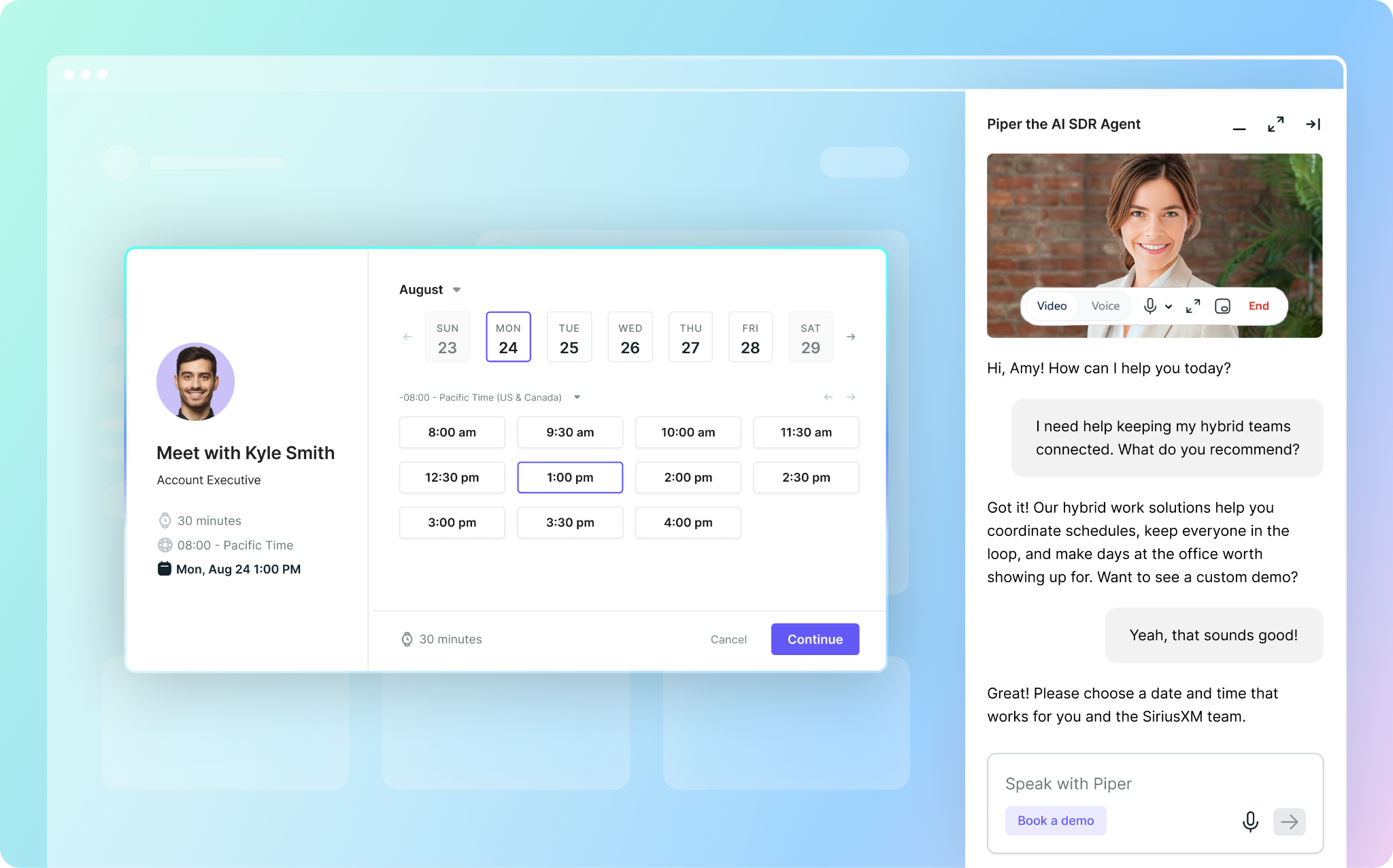
Piper is a powerhouse when it comes to generating pipeline on the website. She’s always working to engage buyers in a conversation, qualify them for sales teams, and get a meeting booked. But sometimes, the meeting booker can get lost in the messenger conversation, which results in lost pipeline. To optimize for conversion, the meeting booker now overlays on top of the website. Visitors can pick a time right in the middle of the conversation without hunting through the messenger during the call. Read the help article to learn more.
Agent Modality Toggle
Now here’s a lot of bang for its buck. Within Agent Studio, you now have total control over your agent’s modality (i.e. video, voice, or text) and how she engages buyers on the website. Experience modality overrides are also available, which means you can override the default modality for each experience and you can test custom avatars before going live across the entire website. Lastly, this feature also gives your buyers the option to toggle between modalities based on their own personal preference. Read the help article to learn more.
Customizable Agent Launcher
This new feature gives you more control over where and how your agent is triggered on the website, instead of using the standard out-of-the-box starting positions. Plus, you can also pass context to the agent so she always starts the conversation with the right message. For example, a “convince my boss” button can trigger a full screen conversation with your agent and the agent knows the conversation is about building a pitch to attend Dreamforce. This feature is ideal for customers who want the agent call or chat entry point to feel more natural. For implementation, you have the two options noted below. Read the help article to learn more.
Customizable Pounce Messages
Agent pounce messages have always included context, but this feature gives you more meaningful control over how your agent greets and nudges visitors on the website across three pounce types: Initial Pounce, Scroll Pounce, and Idle Follow-up. Within the Conversation Guide in Agent Studio, you can now write instructions for your agent’s pounce behavior. You can also reference visitor data fields (i.e. industry) directly in the instructions so the message dynamically adapts to each unique buyer. Read the help article to learn more.
Qualified Field References in Guides
Previously, the only way to capture Qualified field data (i.e. Product Interest) was through a goal. Now, you can @mention Qualified fields directly in the Conversation Guide within Agent Studio so when your agent collects a value for that field during a website conversation, they will update the field value automatically. This means you can capture data without a goal step and you can reference a field value to shape how your agent behaves (i.e. If Account Type is Active Customer, ask if they'd like to connect with their rep.") Read the help article to learn more.
Jump Steps in Goals
Within the Qualified application, Goals define how your agent should behave to achieve desired business outcomes. But these Goals are deterministic and rely on conditional branching logic, which can be complex and arduous to manage. With this feature, you no longer need to duplicate and rebuild entire Goal branches. Instead, you can use a “Jump to Step,” just like Workflows and Experiences. Not only is this much more efficient, it also reduces risk for human error. Read the help article to learn more.
Route for Pounce + Branch Steps
This is an exciting new feature for customers who prefer to keep humans in the loop. Previously, you could not “Route for Pounce” before reaching the “Start Multimodal AI SDR” step in the experience builder. This prevented human reps from being the first point of contact on the website, which is a dealbreaker for customers who want to deliver a high-touch experience. Now, you can add a “Route for (Human) Pounce” step and/or a branch step before triggering the multimodal agent, which routes high-priority visitors to a human sales rep first. Read the help article to learn more.
Intelligently follow-up with and nurture inbound leads in the inbox.
The Agentic Email Playbook
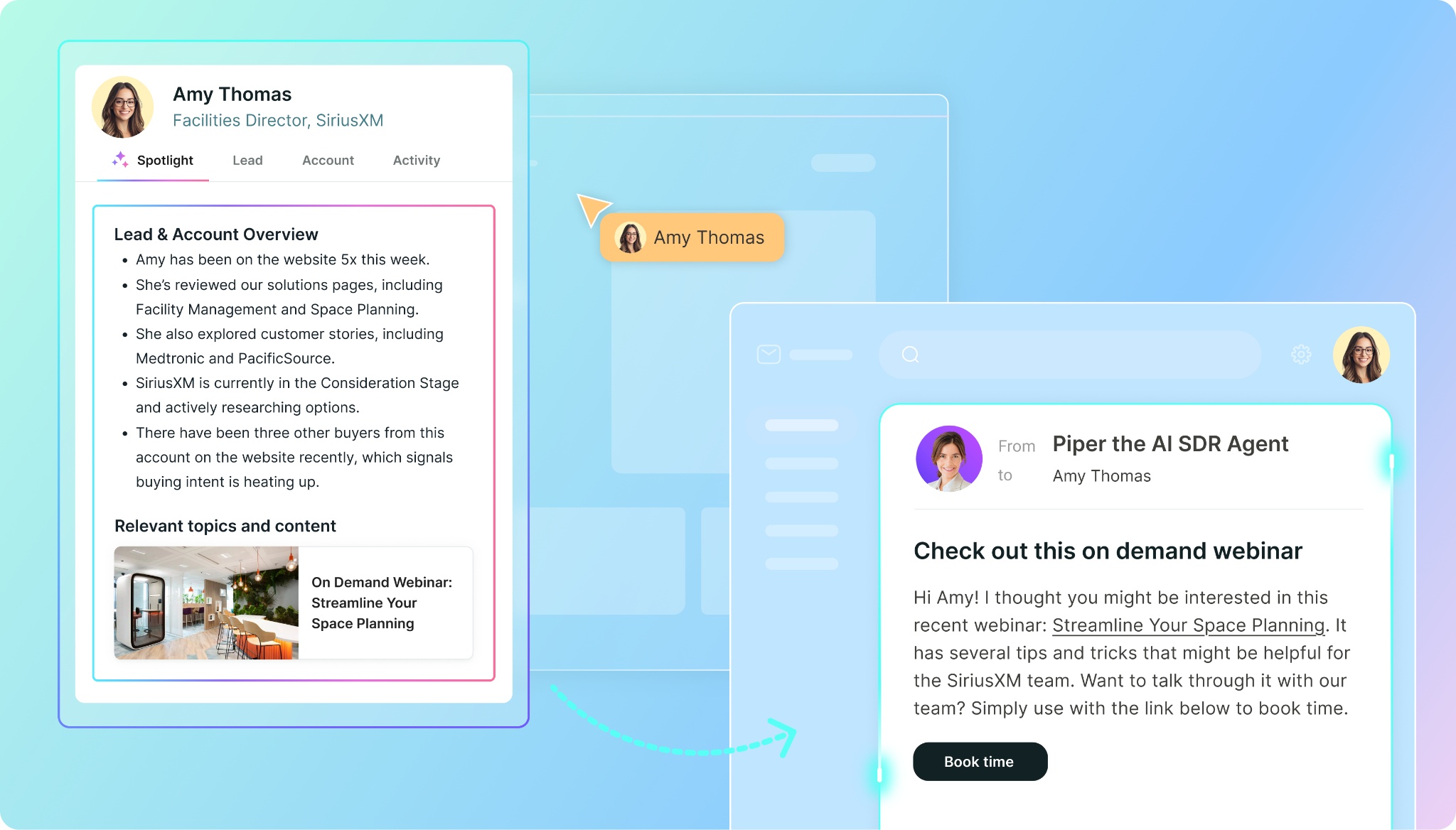
Did you know? Piper can work buyers in the email inbox across their entire buying journey. This is so much more than our basic “meeting offered, not booked” use case. Piper can also nurture buyers after content downloads, she can activate old leads, she can engage high-intent buyers, and much more. Wondering how Piper can unlock more pipeline in the email inbox? Check out the new Agentic Email Playbook to get inspired.
Email Quality Improvements
With agentic email, your agent can craft emails for every unique buyer to keep them engaged. But for this to be truly effective, each email must be personalized, meaningful, and relevant. Previously, the agent was given a lead’s entire history, which resulted in unnecessary and irrelevant details included in the final email. Now, the agent will only access the most relevant information at the time it’s needed. For example, if an email experience is based on browsing behavior, the agent will write the email based only on recent website activity. However, if the campaign is an event invitation, the agent understands it is irrelevant to include any information about their previous session or browsing history and will exclude it.
Email Unsubscribe Enhancements
As with all email products, recipients need to be able to opt out of an email campaign at any time. Previously, we required all unsubscribe handling be done through Qualified, which was too rigid for our customers. Now, we offer unsubscribe enhancements that provide more flexibility so our customers can meet their own compliance requirements. More details below, read the help article to learn more.
Domain Warm-Up
For new mailboxes that have no established reputation, sending a high volume of emails out of the gate can damage sender reputation and deliverability. Domain warming protects that reputation by starting conservative and ramping up gradually so domains build trust with inbox providers before sending at full volume. This new feature follows a multi-week schedule that steps up daily send limits over seven weekly stages (i.e. 100 emails per day in Week 1 and up to unlimited emails in Week 7) to ensure your agent can send high volume emails without risk. Read the help article to learn more.
Always Run Email Experiences
Previously, a lead could only exist in one email campaign at a time and was always removed when they were added to a new campaign. Because of this, the agent couldn't send timely emails—like conversation follow-ups, form-fill confirmations, or targeted event invites—without pulling a lead out of a higher-priority campaign. Plus, a lower-intent one-off email would never reach a lead already enrolled in a higher-ranked campaign. With this feature, leads can now be enrolled in multiple email campaigns at once without disrupting the lead's primary campaign. Read the help article to learn more.
Deliver bespoke buying experiences that generate more pipeline.
Data 360 Integration
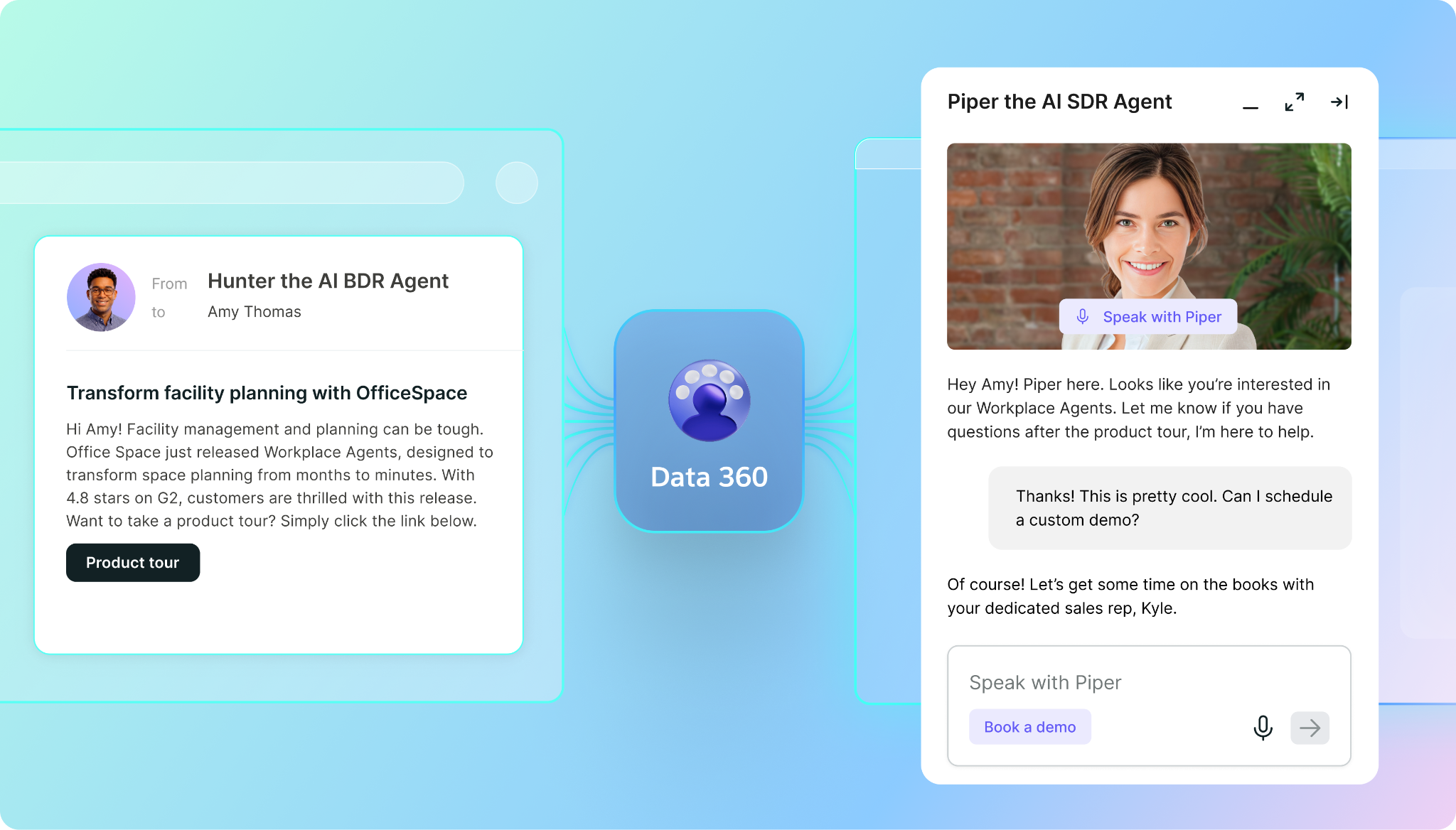
Data 360, Salesforce’s Customer Data Platform, is the agentic context layer and connective tissue between all Agentforce agents. Now, Piper the AI SDR Agent can hook into this data platform to access even more robust data sets and share valuable activities with other agents. This powerful integration makes Piper stronger, smarter, and more collaborative with other Agentforce agents; available now to customers on the Enterprise and Ultimate plans. Check out this blog post to learn more.
Agent Studio: Guides UX Updates
Agent Guides use natural language instructions to tell your agent how to behave. Each guide is designed to manage different parts of the agent’s brain using simple and effective AI-powered prompts. This quarter, we’re releasing two exciting updates to streamline agent training. More details below, read the help article to learn more.
Lead Spotlight: Salesforce iFrame
Within the Qualified application, Spotlight surfaces a succinct snapshot of each buyer and their account. This is where you can see what your agent knows and what’s driving her behavior. Now, you can configure a Salesforce Lightning Component to view the Lead Spotlight on Contact and Lead record pages. This means salespeople can get more context on a lead from the agent right within their Salesforce instance. Read the help article to learn more.
Pre-Routing Questions
With Qualified, your AI SDR agent is purpose-built to schedule meetings and generate pipeline. However, it’s important you’re booking meetings with qualified buyers and those buyers are scheduled with the right people. This new feature allows you to ask the buyer additional questions during the meeting booking process to ensure the buyer is routed correctly and the right calendar is presented. This is especially helpful when a meeting is offered over email (i.e. additional details are needed between email click through and meeting booked). Read the help article to learn more.
Meeting Link Themes
When a buyer arrives on a booking page to schedule a meeting, you want that page to be completely in line with your brand (i.e. logo, colors, header, welcome message, etc.) Historically, our theming tool has always allowed for customization, but it could only be applied to the default theme. Now, you can design a different theme for each meeting type giving you more flexibility and control over each booking page. Read the help article to learn more.
Multiple Admin Edit Capabilities
When multiple admins work in Agent Studio, they inadvertently block each other and slow down edits. But this exciting new feature changes editing restrictions so multiple admins can work simultaneously. There are two scenarios where this applies. Check out the details below:
That’s a wrap for Summer ‘26! If you’re looking for real-time status updates, be sure to check out the Qualified Status Page. Got feedback? We’d love to hear from you. Feel free to chat with us live on the website or connect with your dedicated Qualified Success Architect at any time.
Here’s a roundup of the latest innovations, hot off the press from the Qualified Product team.
It’s official: heat waves, pool parties, and backyard BBQs are in full swing. That means summer is here and so is the Summer ‘26 Release! Jam-packed with new features and functionality, this release continues to separate Piper the AI SDR Agent from the competition and prove why she is the #1 AI SDR agent on the market today. So, grab some lemonade and crank the AC, it’s time to dive in and explore what’s new. 😎
Take control over the visual identity of your AI SDR agent.
If you’ve been wanting a multimodal agent on your website but needed brand consistency, then this update is for you! Custom avatars are officially here, which means you now have total control over the visual identity of your agent. Just upload a static image—whether it be a person, animated character, or a brand mascot—then the Qualified platform will convert it into a dynamic digital agent that can move, speak, and even emote. Plus, custom voices will be released this fall, allowing you to fully control the voice of your agent as well. Read the blog post or check out the help article to learn more and reach out to your Qualified Success Architect to get started today.
Meet buyers on the website in real time with video, voice, and chat.
Full Screen Meeting Booker
Piper is a powerhouse when it comes to generating pipeline on the website. She’s always working to engage buyers in a conversation, qualify them for sales teams, and get a meeting booked. But sometimes, the meeting booker can get lost in the messenger conversation, which results in lost pipeline. To optimize for conversion, the meeting booker now overlays on top of the website. Visitors can pick a time right in the middle of the conversation without hunting through the messenger during the call. Read the help article to learn more.
Agent Modality Toggle
Now here’s a lot of bang for its buck. Within Agent Studio, you now have total control over your agent’s modality (i.e. video, voice, or text) and how she engages buyers on the website. Experience modality overrides are also available, which means you can override the default modality for each experience and you can test custom avatars before going live across the entire website. Lastly, this feature also gives your buyers the option to toggle between modalities based on their own personal preference. Read the help article to learn more.
Customizable Agent Launcher
This new feature gives you more control over where and how your agent is triggered on the website, instead of using the standard out-of-the-box starting positions. Plus, you can also pass context to the agent so she always starts the conversation with the right message. For example, a “convince my boss” button can trigger a full screen conversation with your agent and the agent knows the conversation is about building a pitch to attend Dreamforce. This feature is ideal for customers who want the agent call or chat entry point to feel more natural. For implementation, you have the two options noted below. Read the help article to learn more.
Customizable Pounce Messages
Agent pounce messages have always included context, but this feature gives you more meaningful control over how your agent greets and nudges visitors on the website across three pounce types: Initial Pounce, Scroll Pounce, and Idle Follow-up. Within the Conversation Guide in Agent Studio, you can now write instructions for your agent’s pounce behavior. You can also reference visitor data fields (i.e. industry) directly in the instructions so the message dynamically adapts to each unique buyer. Read the help article to learn more.
Qualified Field References in Guides
Previously, the only way to capture Qualified field data (i.e. Product Interest) was through a goal. Now, you can @mention Qualified fields directly in the Conversation Guide within Agent Studio so when your agent collects a value for that field during a website conversation, they will update the field value automatically. This means you can capture data without a goal step and you can reference a field value to shape how your agent behaves (i.e. If Account Type is Active Customer, ask if they'd like to connect with their rep.") Read the help article to learn more.
Jump Steps in Goals
Within the Qualified application, Goals define how your agent should behave to achieve desired business outcomes. But these Goals are deterministic and rely on conditional branching logic, which can be complex and arduous to manage. With this feature, you no longer need to duplicate and rebuild entire Goal branches. Instead, you can use a “Jump to Step,” just like Workflows and Experiences. Not only is this much more efficient, it also reduces risk for human error. Read the help article to learn more.
Route for Pounce + Branch Steps
This is an exciting new feature for customers who prefer to keep humans in the loop. Previously, you could not “Route for Pounce” before reaching the “Start Multimodal AI SDR” step in the experience builder. This prevented human reps from being the first point of contact on the website, which is a dealbreaker for customers who want to deliver a high-touch experience. Now, you can add a “Route for (Human) Pounce” step and/or a branch step before triggering the multimodal agent, which routes high-priority visitors to a human sales rep first. Read the help article to learn more.
Intelligently follow-up with and nurture inbound leads in the inbox.
The Agentic Email Playbook
Did you know? Piper can work buyers in the email inbox across their entire buying journey. This is so much more than our basic “meeting offered, not booked” use case. Piper can also nurture buyers after content downloads, she can activate old leads, she can engage high-intent buyers, and much more. Wondering how Piper can unlock more pipeline in the email inbox? Check out the new Agentic Email Playbook to get inspired.
Email Quality Improvements
With agentic email, your agent can craft emails for every unique buyer to keep them engaged. But for this to be truly effective, each email must be personalized, meaningful, and relevant. Previously, the agent was given a lead’s entire history, which resulted in unnecessary and irrelevant details included in the final email. Now, the agent will only access the most relevant information at the time it’s needed. For example, if an email experience is based on browsing behavior, the agent will write the email based only on recent website activity. However, if the campaign is an event invitation, the agent understands it is irrelevant to include any information about their previous session or browsing history and will exclude it.
Email Unsubscribe Enhancements
As with all email products, recipients need to be able to opt out of an email campaign at any time. Previously, we required all unsubscribe handling be done through Qualified, which was too rigid for our customers. Now, we offer unsubscribe enhancements that provide more flexibility so our customers can meet their own compliance requirements. More details below, read the help article to learn more.
Domain Warm-Up
For new mailboxes that have no established reputation, sending a high volume of emails out of the gate can damage sender reputation and deliverability. Domain warming protects that reputation by starting conservative and ramping up gradually so domains build trust with inbox providers before sending at full volume. This new feature follows a multi-week schedule that steps up daily send limits over seven weekly stages (i.e. 100 emails per day in Week 1 and up to unlimited emails in Week 7) to ensure your agent can send high volume emails without risk. Read the help article to learn more.
Always Run Email Experiences
Previously, a lead could only exist in one email campaign at a time and was always removed when they were added to a new campaign. Because of this, the agent couldn't send timely emails—like conversation follow-ups, form-fill confirmations, or targeted event invites—without pulling a lead out of a higher-priority campaign. Plus, a lower-intent one-off email would never reach a lead already enrolled in a higher-ranked campaign. With this feature, leads can now be enrolled in multiple email campaigns at once without disrupting the lead's primary campaign. Read the help article to learn more.
Deliver bespoke buying experiences that generate more pipeline.
Data 360 Integration
Data 360, Salesforce’s Customer Data Platform, is the agentic context layer and connective tissue between all Agentforce agents. Now, Piper the AI SDR Agent can hook into this data platform to access even more robust data sets and share valuable activities with other agents. This powerful integration makes Piper stronger, smarter, and more collaborative with other Agentforce agents; available now to customers on the Enterprise and Ultimate plans. Check out this blog post to learn more.
Agent Studio: Guides UX Updates
Agent Guides use natural language instructions to tell your agent how to behave. Each guide is designed to manage different parts of the agent’s brain using simple and effective AI-powered prompts. This quarter, we’re releasing two exciting updates to streamline agent training. More details below, read the help article to learn more.
Lead Spotlight: Salesforce iFrame
Within the Qualified application, Spotlight surfaces a succinct snapshot of each buyer and their account. This is where you can see what your agent knows and what’s driving her behavior. Now, you can configure a Salesforce Lightning Component to view the Lead Spotlight on Contact and Lead record pages. This means salespeople can get more context on a lead from the agent right within their Salesforce instance. Read the help article to learn more.
Pre-Routing Questions
With Qualified, your AI SDR agent is purpose-built to schedule meetings and generate pipeline. However, it’s important you’re booking meetings with qualified buyers and those buyers are scheduled with the right people. This new feature allows you to ask the buyer additional questions during the meeting booking process to ensure the buyer is routed correctly and the right calendar is presented. This is especially helpful when a meeting is offered over email (i.e. additional details are needed between email click through and meeting booked). Read the help article to learn more.
Meeting Link Themes
When a buyer arrives on a booking page to schedule a meeting, you want that page to be completely in line with your brand (i.e. logo, colors, header, welcome message, etc.) Historically, our theming tool has always allowed for customization, but it could only be applied to the default theme. Now, you can design a different theme for each meeting type giving you more flexibility and control over each booking page. Read the help article to learn more.
Multiple Admin Edit Capabilities
When multiple admins work in Agent Studio, they inadvertently block each other and slow down edits. But this exciting new feature changes editing restrictions so multiple admins can work simultaneously. There are two scenarios where this applies. Check out the details below:
That’s a wrap for Summer ‘26! If you’re looking for real-time status updates, be sure to check out the Qualified Status Page. Got feedback? We’d love to hear from you. Feel free to chat with us live on the website or connect with your dedicated Qualified Success Architect at any time.
Here’s a roundup of the latest innovations, hot off the press from the Qualified Product team.
It’s official: heat waves, pool parties, and backyard BBQs are in full swing. That means summer is here and so is the Summer ‘26 Release! Jam-packed with new features and functionality, this release continues to separate Piper the AI SDR Agent from the competition and prove why she is the #1 AI SDR agent on the market today. So, grab some lemonade and crank the AC, it’s time to dive in and explore what’s new. 😎
Take control over the visual identity of your AI SDR agent.
If you’ve been wanting a multimodal agent on your website but needed brand consistency, then this update is for you! Custom avatars are officially here, which means you now have total control over the visual identity of your agent. Just upload a static image—whether it be a person, animated character, or a brand mascot—then the Qualified platform will convert it into a dynamic digital agent that can move, speak, and even emote. Plus, custom voices will be released this fall, allowing you to fully control the voice of your agent as well. Read the blog post or check out the help article to learn more and reach out to your Qualified Success Architect to get started today.
Meet buyers on the website in real time with video, voice, and chat.
Full Screen Meeting Booker
Piper is a powerhouse when it comes to generating pipeline on the website. She’s always working to engage buyers in a conversation, qualify them for sales teams, and get a meeting booked. But sometimes, the meeting booker can get lost in the messenger conversation, which results in lost pipeline. To optimize for conversion, the meeting booker now overlays on top of the website. Visitors can pick a time right in the middle of the conversation without hunting through the messenger during the call. Read the help article to learn more.
Agent Modality Toggle
Now here’s a lot of bang for its buck. Within Agent Studio, you now have total control over your agent’s modality (i.e. video, voice, or text) and how she engages buyers on the website. Experience modality overrides are also available, which means you can override the default modality for each experience and you can test custom avatars before going live across the entire website. Lastly, this feature also gives your buyers the option to toggle between modalities based on their own personal preference. Read the help article to learn more.
Customizable Agent Launcher
This new feature gives you more control over where and how your agent is triggered on the website, instead of using the standard out-of-the-box starting positions. Plus, you can also pass context to the agent so she always starts the conversation with the right message. For example, a “convince my boss” button can trigger a full screen conversation with your agent and the agent knows the conversation is about building a pitch to attend Dreamforce. This feature is ideal for customers who want the agent call or chat entry point to feel more natural. For implementation, you have the two options noted below. Read the help article to learn more.
Customizable Pounce Messages
Agent pounce messages have always included context, but this feature gives you more meaningful control over how your agent greets and nudges visitors on the website across three pounce types: Initial Pounce, Scroll Pounce, and Idle Follow-up. Within the Conversation Guide in Agent Studio, you can now write instructions for your agent’s pounce behavior. You can also reference visitor data fields (i.e. industry) directly in the instructions so the message dynamically adapts to each unique buyer. Read the help article to learn more.
Qualified Field References in Guides
Previously, the only way to capture Qualified field data (i.e. Product Interest) was through a goal. Now, you can @mention Qualified fields directly in the Conversation Guide within Agent Studio so when your agent collects a value for that field during a website conversation, they will update the field value automatically. This means you can capture data without a goal step and you can reference a field value to shape how your agent behaves (i.e. If Account Type is Active Customer, ask if they'd like to connect with their rep.") Read the help article to learn more.
Jump Steps in Goals
Within the Qualified application, Goals define how your agent should behave to achieve desired business outcomes. But these Goals are deterministic and rely on conditional branching logic, which can be complex and arduous to manage. With this feature, you no longer need to duplicate and rebuild entire Goal branches. Instead, you can use a “Jump to Step,” just like Workflows and Experiences. Not only is this much more efficient, it also reduces risk for human error. Read the help article to learn more.
Route for Pounce + Branch Steps
This is an exciting new feature for customers who prefer to keep humans in the loop. Previously, you could not “Route for Pounce” before reaching the “Start Multimodal AI SDR” step in the experience builder. This prevented human reps from being the first point of contact on the website, which is a dealbreaker for customers who want to deliver a high-touch experience. Now, you can add a “Route for (Human) Pounce” step and/or a branch step before triggering the multimodal agent, which routes high-priority visitors to a human sales rep first. Read the help article to learn more.
Intelligently follow-up with and nurture inbound leads in the inbox.
The Agentic Email Playbook
Did you know? Piper can work buyers in the email inbox across their entire buying journey. This is so much more than our basic “meeting offered, not booked” use case. Piper can also nurture buyers after content downloads, she can activate old leads, she can engage high-intent buyers, and much more. Wondering how Piper can unlock more pipeline in the email inbox? Check out the new Agentic Email Playbook to get inspired.
Email Quality Improvements
With agentic email, your agent can craft emails for every unique buyer to keep them engaged. But for this to be truly effective, each email must be personalized, meaningful, and relevant. Previously, the agent was given a lead’s entire history, which resulted in unnecessary and irrelevant details included in the final email. Now, the agent will only access the most relevant information at the time it’s needed. For example, if an email experience is based on browsing behavior, the agent will write the email based only on recent website activity. However, if the campaign is an event invitation, the agent understands it is irrelevant to include any information about their previous session or browsing history and will exclude it.
Email Unsubscribe Enhancements
As with all email products, recipients need to be able to opt out of an email campaign at any time. Previously, we required all unsubscribe handling be done through Qualified, which was too rigid for our customers. Now, we offer unsubscribe enhancements that provide more flexibility so our customers can meet their own compliance requirements. More details below, read the help article to learn more.
Domain Warm-Up
For new mailboxes that have no established reputation, sending a high volume of emails out of the gate can damage sender reputation and deliverability. Domain warming protects that reputation by starting conservative and ramping up gradually so domains build trust with inbox providers before sending at full volume. This new feature follows a multi-week schedule that steps up daily send limits over seven weekly stages (i.e. 100 emails per day in Week 1 and up to unlimited emails in Week 7) to ensure your agent can send high volume emails without risk. Read the help article to learn more.
Always Run Email Experiences
Previously, a lead could only exist in one email campaign at a time and was always removed when they were added to a new campaign. Because of this, the agent couldn't send timely emails—like conversation follow-ups, form-fill confirmations, or targeted event invites—without pulling a lead out of a higher-priority campaign. Plus, a lower-intent one-off email would never reach a lead already enrolled in a higher-ranked campaign. With this feature, leads can now be enrolled in multiple email campaigns at once without disrupting the lead's primary campaign. Read the help article to learn more.
Deliver bespoke buying experiences that generate more pipeline.
Data 360 Integration
Data 360, Salesforce’s Customer Data Platform, is the agentic context layer and connective tissue between all Agentforce agents. Now, Piper the AI SDR Agent can hook into this data platform to access even more robust data sets and share valuable activities with other agents. This powerful integration makes Piper stronger, smarter, and more collaborative with other Agentforce agents; available now to customers on the Enterprise and Ultimate plans. Check out this blog post to learn more.
Agent Studio: Guides UX Updates
Agent Guides use natural language instructions to tell your agent how to behave. Each guide is designed to manage different parts of the agent’s brain using simple and effective AI-powered prompts. This quarter, we’re releasing two exciting updates to streamline agent training. More details below, read the help article to learn more.
Lead Spotlight: Salesforce iFrame
Within the Qualified application, Spotlight surfaces a succinct snapshot of each buyer and their account. This is where you can see what your agent knows and what’s driving her behavior. Now, you can configure a Salesforce Lightning Component to view the Lead Spotlight on Contact and Lead record pages. This means salespeople can get more context on a lead from the agent right within their Salesforce instance. Read the help article to learn more.
Pre-Routing Questions
With Qualified, your AI SDR agent is purpose-built to schedule meetings and generate pipeline. However, it’s important you’re booking meetings with qualified buyers and those buyers are scheduled with the right people. This new feature allows you to ask the buyer additional questions during the meeting booking process to ensure the buyer is routed correctly and the right calendar is presented. This is especially helpful when a meeting is offered over email (i.e. additional details are needed between email click through and meeting booked). Read the help article to learn more.
Meeting Link Themes
When a buyer arrives on a booking page to schedule a meeting, you want that page to be completely in line with your brand (i.e. logo, colors, header, welcome message, etc.) Historically, our theming tool has always allowed for customization, but it could only be applied to the default theme. Now, you can design a different theme for each meeting type giving you more flexibility and control over each booking page. Read the help article to learn more.
Multiple Admin Edit Capabilities
When multiple admins work in Agent Studio, they inadvertently block each other and slow down edits. But this exciting new feature changes editing restrictions so multiple admins can work simultaneously. There are two scenarios where this applies. Check out the details below:
That’s a wrap for Summer ‘26! If you’re looking for real-time status updates, be sure to check out the Qualified Status Page. Got feedback? We’d love to hear from you. Feel free to chat with us live on the website or connect with your dedicated Qualified Success Architect at any time.
It’s official: heat waves, pool parties, and backyard BBQs are in full swing. That means summer is here and so is the Summer ‘26 Release! Jam-packed with new features and functionality, this release continues to separate Piper the AI SDR Agent from the competition and prove why she is the #1 AI SDR agent on the market today. So, grab some lemonade and crank the AC, it’s time to dive in and explore what’s new. 😎
Take control over the visual identity of your AI SDR agent.
If you’ve been wanting a multimodal agent on your website but needed brand consistency, then this update is for you! Custom avatars are officially here, which means you now have total control over the visual identity of your agent. Just upload a static image—whether it be a person, animated character, or a brand mascot—then the Qualified platform will convert it into a dynamic digital agent that can move, speak, and even emote. Plus, custom voices will be released this fall, allowing you to fully control the voice of your agent as well. Read the blog post or check out the help article to learn more and reach out to your Qualified Success Architect to get started today.
Meet buyers on the website in real time with video, voice, and chat.
Full Screen Meeting Booker
Piper is a powerhouse when it comes to generating pipeline on the website. She’s always working to engage buyers in a conversation, qualify them for sales teams, and get a meeting booked. But sometimes, the meeting booker can get lost in the messenger conversation, which results in lost pipeline. To optimize for conversion, the meeting booker now overlays on top of the website. Visitors can pick a time right in the middle of the conversation without hunting through the messenger during the call. Read the help article to learn more.
Agent Modality Toggle
Now here’s a lot of bang for its buck. Within Agent Studio, you now have total control over your agent’s modality (i.e. video, voice, or text) and how she engages buyers on the website. Experience modality overrides are also available, which means you can override the default modality for each experience and you can test custom avatars before going live across the entire website. Lastly, this feature also gives your buyers the option to toggle between modalities based on their own personal preference. Read the help article to learn more.
Customizable Agent Launcher
This new feature gives you more control over where and how your agent is triggered on the website, instead of using the standard out-of-the-box starting positions. Plus, you can also pass context to the agent so she always starts the conversation with the right message. For example, a “convince my boss” button can trigger a full screen conversation with your agent and the agent knows the conversation is about building a pitch to attend Dreamforce. This feature is ideal for customers who want the agent call or chat entry point to feel more natural. For implementation, you have the two options noted below. Read the help article to learn more.
Customizable Pounce Messages
Agent pounce messages have always included context, but this feature gives you more meaningful control over how your agent greets and nudges visitors on the website across three pounce types: Initial Pounce, Scroll Pounce, and Idle Follow-up. Within the Conversation Guide in Agent Studio, you can now write instructions for your agent’s pounce behavior. You can also reference visitor data fields (i.e. industry) directly in the instructions so the message dynamically adapts to each unique buyer. Read the help article to learn more.
Qualified Field References in Guides
Previously, the only way to capture Qualified field data (i.e. Product Interest) was through a goal. Now, you can @mention Qualified fields directly in the Conversation Guide within Agent Studio so when your agent collects a value for that field during a website conversation, they will update the field value automatically. This means you can capture data without a goal step and you can reference a field value to shape how your agent behaves (i.e. If Account Type is Active Customer, ask if they'd like to connect with their rep.") Read the help article to learn more.
Jump Steps in Goals
Within the Qualified application, Goals define how your agent should behave to achieve desired business outcomes. But these Goals are deterministic and rely on conditional branching logic, which can be complex and arduous to manage. With this feature, you no longer need to duplicate and rebuild entire Goal branches. Instead, you can use a “Jump to Step,” just like Workflows and Experiences. Not only is this much more efficient, it also reduces risk for human error. Read the help article to learn more.
Route for Pounce + Branch Steps
This is an exciting new feature for customers who prefer to keep humans in the loop. Previously, you could not “Route for Pounce” before reaching the “Start Multimodal AI SDR” step in the experience builder. This prevented human reps from being the first point of contact on the website, which is a dealbreaker for customers who want to deliver a high-touch experience. Now, you can add a “Route for (Human) Pounce” step and/or a branch step before triggering the multimodal agent, which routes high-priority visitors to a human sales rep first. Read the help article to learn more.
Intelligently follow-up with and nurture inbound leads in the inbox.
The Agentic Email Playbook
Did you know? Piper can work buyers in the email inbox across their entire buying journey. This is so much more than our basic “meeting offered, not booked” use case. Piper can also nurture buyers after content downloads, she can activate old leads, she can engage high-intent buyers, and much more. Wondering how Piper can unlock more pipeline in the email inbox? Check out the new Agentic Email Playbook to get inspired.
Email Quality Improvements
With agentic email, your agent can craft emails for every unique buyer to keep them engaged. But for this to be truly effective, each email must be personalized, meaningful, and relevant. Previously, the agent was given a lead’s entire history, which resulted in unnecessary and irrelevant details included in the final email. Now, the agent will only access the most relevant information at the time it’s needed. For example, if an email experience is based on browsing behavior, the agent will write the email based only on recent website activity. However, if the campaign is an event invitation, the agent understands it is irrelevant to include any information about their previous session or browsing history and will exclude it.
Email Unsubscribe Enhancements
As with all email products, recipients need to be able to opt out of an email campaign at any time. Previously, we required all unsubscribe handling be done through Qualified, which was too rigid for our customers. Now, we offer unsubscribe enhancements that provide more flexibility so our customers can meet their own compliance requirements. More details below, read the help article to learn more.
Domain Warm-Up
For new mailboxes that have no established reputation, sending a high volume of emails out of the gate can damage sender reputation and deliverability. Domain warming protects that reputation by starting conservative and ramping up gradually so domains build trust with inbox providers before sending at full volume. This new feature follows a multi-week schedule that steps up daily send limits over seven weekly stages (i.e. 100 emails per day in Week 1 and up to unlimited emails in Week 7) to ensure your agent can send high volume emails without risk. Read the help article to learn more.
Always Run Email Experiences
Previously, a lead could only exist in one email campaign at a time and was always removed when they were added to a new campaign. Because of this, the agent couldn't send timely emails—like conversation follow-ups, form-fill confirmations, or targeted event invites—without pulling a lead out of a higher-priority campaign. Plus, a lower-intent one-off email would never reach a lead already enrolled in a higher-ranked campaign. With this feature, leads can now be enrolled in multiple email campaigns at once without disrupting the lead's primary campaign. Read the help article to learn more.
Deliver bespoke buying experiences that generate more pipeline.
Data 360 Integration
Data 360, Salesforce’s Customer Data Platform, is the agentic context layer and connective tissue between all Agentforce agents. Now, Piper the AI SDR Agent can hook into this data platform to access even more robust data sets and share valuable activities with other agents. This powerful integration makes Piper stronger, smarter, and more collaborative with other Agentforce agents; available now to customers on the Enterprise and Ultimate plans. Check out this blog post to learn more.
Agent Studio: Guides UX Updates
Agent Guides use natural language instructions to tell your agent how to behave. Each guide is designed to manage different parts of the agent’s brain using simple and effective AI-powered prompts. This quarter, we’re releasing two exciting updates to streamline agent training. More details below, read the help article to learn more.
Lead Spotlight: Salesforce iFrame
Within the Qualified application, Spotlight surfaces a succinct snapshot of each buyer and their account. This is where you can see what your agent knows and what’s driving her behavior. Now, you can configure a Salesforce Lightning Component to view the Lead Spotlight on Contact and Lead record pages. This means salespeople can get more context on a lead from the agent right within their Salesforce instance. Read the help article to learn more.
Pre-Routing Questions
With Qualified, your AI SDR agent is purpose-built to schedule meetings and generate pipeline. However, it’s important you’re booking meetings with qualified buyers and those buyers are scheduled with the right people. This new feature allows you to ask the buyer additional questions during the meeting booking process to ensure the buyer is routed correctly and the right calendar is presented. This is especially helpful when a meeting is offered over email (i.e. additional details are needed between email click through and meeting booked). Read the help article to learn more.
Meeting Link Themes
When a buyer arrives on a booking page to schedule a meeting, you want that page to be completely in line with your brand (i.e. logo, colors, header, welcome message, etc.) Historically, our theming tool has always allowed for customization, but it could only be applied to the default theme. Now, you can design a different theme for each meeting type giving you more flexibility and control over each booking page. Read the help article to learn more.
Multiple Admin Edit Capabilities
When multiple admins work in Agent Studio, they inadvertently block each other and slow down edits. But this exciting new feature changes editing restrictions so multiple admins can work simultaneously. There are two scenarios where this applies. Check out the details below:
That’s a wrap for Summer ‘26! If you’re looking for real-time status updates, be sure to check out the Qualified Status Page. Got feedback? We’d love to hear from you. Feel free to chat with us live on the website or connect with your dedicated Qualified Success Architect at any time.
Discover how we can help you convert more prospects into pipeline–right from your website.

Stay up to date with weekly drops of fresh B2B marketing and sales content.




.svg)


